How to Optimize Google Ads Campaigns for Seasonality
- Kristina Cutura
- Apr 29
- 5 min read

Many advertisers set their Google Ads campaigns to run year-round without much adjustment. It's one of the most common issues Google Ads experts see and it can be costly, as it misses a crucial lever in paid search - seasonality. Whether your business slows down in January or ramps up for holiday sales, your campaigns need to reflect market realities. Running the same ad copy, with the same budget and bids in January as you’d do in December creates missed opportunities and wasted spend. This blog provides practical steps to proactively manage and maximize seasonality-related campaign impacts.
How to Tell If Your Account Has Seasonal Patterns
Before you can plan for seasonality, you need to know how it is relevant to your account. The best way to do this is by looking at the data. Start with a look at a year’s worth of data in Google Ads. Go to Campaigns → All Campaigns, set your date range to the past 12 months, and segment by month.
Analyze impressions, clicks, conversion rate, and cost per conversion over time. Things to look out for include months where volume spikes or drops off consistently, months where your cost per lead jumps, or months where CTR changes without other adjustments on your end.
Where to Look for Seasonal Patterns |
Google Ads → All Campaigns → Set date range to "Last 12 months" → Segment by month. Export to a spreadsheet and plot impressions and conversion rate side by side. Look for clear patterns. |
If you have at least two years of data, compare year over year. A 30% drop in impressions every August for two consecutive years, for example, is a clear pattern.
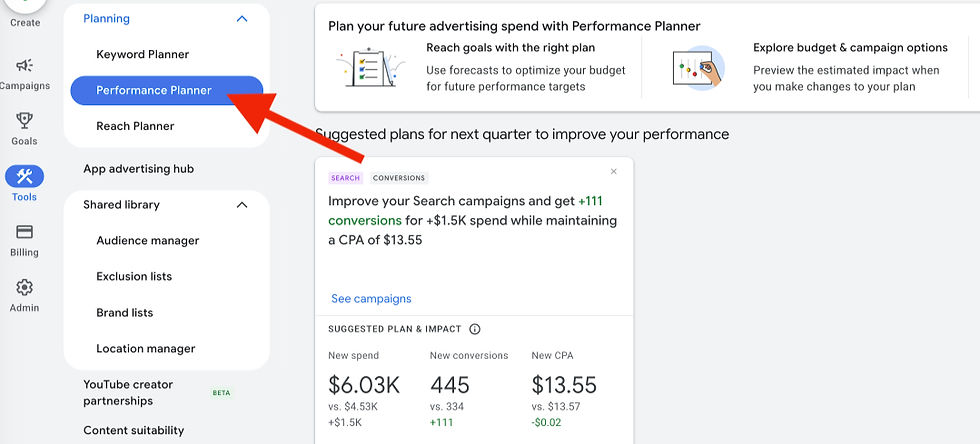
Google also surfaces seasonality signals in the Auction Insights report and in the Planning → Performance Planner tool, which can model how seasonal changes in search volume may affect your results.
Another useful tool is Google Trends, which is free and shows you how search interest in your core terms moves across months. If you sell landscaping services and "lawn care" searches peak in March, you know your high season before you even look at the data.
Budget Adjustments: When to Spend More, When to Pull Back
A flat budget is one of the most common seasonality mistakes a Google Ads consultant will flag in an account audit. During high-demand periods, keeping the budget low can cost you. If your campaigns are hitting their daily budget limit in November when demand is at its peak, you are losing impressions and qualified traffic to competitors who are not budget-capped, at a time when your customers are most ready to buy. At the same time, maintaining high spend during a slow period can unnecessarily burn money. Consider reducing budget in your slow months and reallocating that spend to your peak months.
Period | Budget Action | Why |
Peak season (4–6 weeks out) | Start increasing budgets gradually; set budget rules | Avoids campaign learning disruption from sudden changes |
Active peak period | Re-assess budget caps; monitor for pacing | Demand is there — do not let the budget be the limiting factor |
Transition out of peak | Step budgets down | Prevents performance data cliff that disrupts Smart Bidding models |
Confirmed slow period | Reduce to baseline; redirect savings to peak fund | Lower volume = lower returns on marginal spend |
One important note for Smart Bidding accounts: avoid sudden large budget changes. A campaign that has been running at $100/day may not respond well to an immediate jump to $400/day. The bidding model needs time to adapt. Make your adjustment gradual, moving budget in about 15–20% increments every few days.
Smart Bidding and Seasonality Adjustments |
Google Ads offers a Seasonality Adjustment feature under Tools & Settings → Bid Strategies. It lets you tell Smart Bidding to expect a conversion rate change on specific dates, which is useful for known promotions or events. Make sure to set it a few days before the event. |
The Importance of Ad Copy Refreshes for Different Times of Year
Stale ad copy can erode CTR. If someone searches for "last-minute Father's Day gift" and your ad ignores “Father’s Day,” your competitor with up to date copy wins the click. A person searching in December is in a different headspace than the same person searching in March. Your ad copy messaging should reflect that.
Here are some examples of promotions an e-commerce account may plan for annually:
Time Period | Seasonal Moment | What to Update |
Q4 (Oct–Dec) | Black Friday, Cyber Monday, Holiday | Ad copy, landing pages, bids, budget caps, countdown extensions |
January | New Year resolutions, post-holiday clearance | Messaging pivot to "new year, new you" or clearance angle |
Q1–Q2 | Valentine's Day, Spring, Easter, Mother's Day | Ad copy, landing pages, gift-angle messaging where relevant |
Q2–Q3 | Back to School, Father's Day, Summer | Copy refresh, audience bid adjustments for demographic fit |
Q3–Q4 | Fall, Pre-holiday planning | Early access messaging, inventory or booking urgency |
Ad Copy Refreshes: What to Change and How Often
A good seasonal copy framework has three layers: evergreen headlines, seasonal headlines, and promotional headlines. Evergreen headlines make up your baseline. They stay live year-round because they describe what you do and why customers should choose you.
Seasonal headlines rotate in and out based on the time of year. Promotional headlines are time-sensitive and have an end date.
Audit your current RSA assets. Pull an Asset Report in Google Ads (Ads & Extensions → Ads → Asset details) and see which assets are rated "Best," "Good," or "Low." Low-performing assets should be the first ones replaced with seasonal copy.
Write 3–4 seasonal headline options per campaign. Update more than one headline to give the algorithm options. If you have a holiday promo, write a deadline-focused headline ("Ships by Dec 22"), a value-focused headline ("Free Gift Wrapping + Free Shipping"), and an emotional headline ("The Gift They’ll Remember").
Update description lines too. Descriptions give you 90 characters to reinforce urgency, expand on the offer, and include a CTA.
Create promo extensions. Promotion extensions are easy to set up and easy to schedule. In just a few minutes you can set one up, with a start and end date that automatically deactivates when the promo ends.

Pin relevant headlines and descriptions: In Responsive Search Ads, pin your most time-sensitive assets to Headline 1 or Headline 2 to ensure that Google will feature them.
Schedule copy changes in advance. Google Ads allows you to use Ad Scheduling and the Campaign Draft & Experiments feature to pre-stage ad changes.
Pause seasonal content when the promo or the seasonally relevant moment ends. Make sure to pause the promos and seasonal ad copy after the relevant period ends. It’s easiest to put the end date in your calendar when you create the promotion, with a reminder to remove the ad copy.
A Simple Seasonal Optimization Checklist
Seasonality management is not complicated, but it does need to be carefully planned for. As a Google Ads consultant, here's the step-by-step framework I use to incorporate it into account management:
Pull monthly performance data and confirm your high and low periods
Set budget adjustments in your planning document for the upcoming quarter
Update ad copy to reflect the current season and any planned promotions
Review landing pages for message match to seasonal copy
Set or update Seasonality Adjustments in Smart Bidding if a major promo is coming
Add a calendar reminder to revert copy and budgets after each promo window closes
The businesses that maximize Google Ads impact during peak seasons are those that prepare in advance, keep their copy aligned with what their customers were actually looking for, and proactively adjust for seasonality year-round.